ObjoModbus
A Modbus TCP client (master) for Objo Studio 26.10.5. It comes with a GUI test application
and a command-line tool.
Requests and responses follow the MODBUS Application Protocol Specification V1.1b3 and the
MODBUS Messaging on TCP/IP Implementation Guide V1.0b. They are checked against the worked
examples in the specification.
Quick start
- Open
ObjoModbus.objo in Objo Studio. This one file contains everything; nothing else
needs to be installed.
- Start a simulator:
python3 modbus_sim.py --port 1502
- Run ModbusTester, connect to
127.0.0.1:1502 and press Send.
Contents of the solution
| Part | What |
|---|
| Shared Code | The Modbus library: ModbusProtocol, ModbusTcpMaster, ModbusTcpConnection, ModbusResponse, ModbusStatus, ModbusSelfTest |
ModbusTester (Desktop, default) | GUI test client. MainWindow |
ModbusCli (Command Line) | Offline self-test, live test and a simple register read |
Plugin eu.madru.bytesocket 1.0.0 | Binary-safe TCP socket (Madru.Net.ByteSocket), embedded in the .objo, used by both projects |
Built applications carry the plugin with them (under Plugins/eu.madru.bytesocket). A built
app therefore runs on other computers without Studio or a plugin installation.
Supported function codes
| FC | Function | Limit |
|---|
| 1 | Read Coils | 1..2000 |
| 2 | Read Discrete Inputs | 1..2000 |
| 3 | Read Holding Registers | 1..125 |
| 4 | Read Input Registers | 1..125 |
| 5 | Write Single Coil | 0xFF00 / 0x0000 |
| 6 | Write Single Register | |
| 15 | Write Multiple Coils | 1..1968 |
| 16 | Write Multiple Registers | 1..123 |
| 23 | Read/Write Multiple Registers | read 1..125, write 1..121 |
Responses are validated before they are accepted:
- the transaction id must match, and the protocol id must be 0
- the MBAP length is checked
- the unit id must be echoed
- the function code must match
- the byte count must match the requested quantity
- write responses must echo the request
- exception responses must be exactly 2 bytes
Requests are queued so that only one is on the wire at a time. Answers that arrive after a
timeout are recognised and discarded.
Using the library
All addresses are zero-based PDU addresses (holding register 40001 = address 0).
Var master As New ModbusTcpMaster()
If Await master.ConnectAsync("192.168.1.50", 502) Then
Var r As ModbusResponse = Await master.ReadHoldingRegistersAsync(1, 0, 10)
If r.Succeeded Then
Print(r.Registers[0].ToString()) # unsigned 0..65535
Print(r.SignedRegister(0).ToString()) # signed -32768..32767
Print(r.Int32At(0, True).ToString()) # two registers, high word first
Else
Print(r.Describe()) # Status + Message, never an exception
End If
End If
- Every request returns a
ModbusResponse. Errors come back as values, never as exceptions.
Status is one of: Success, DeviceException (see ExceptionCode), Timeout,
NotConnected, ConnectionLost, InvalidRequest (rejected locally, not sent) or
InvalidResponse.ResponseTimeout defaults to 1 s and ConnectTimeout to 3 s.- With
AutoReconnect on, the master reconnects every ReconnectInterval (5 s) until you call
Disconnect().
- Events:
ConnectionChanged(connected, reason), and Traffic(sent, adu) for a raw frame monitor.
- Register values can be given signed (-32768..32767) or unsigned (0..65535).
GUI: ModbusTester
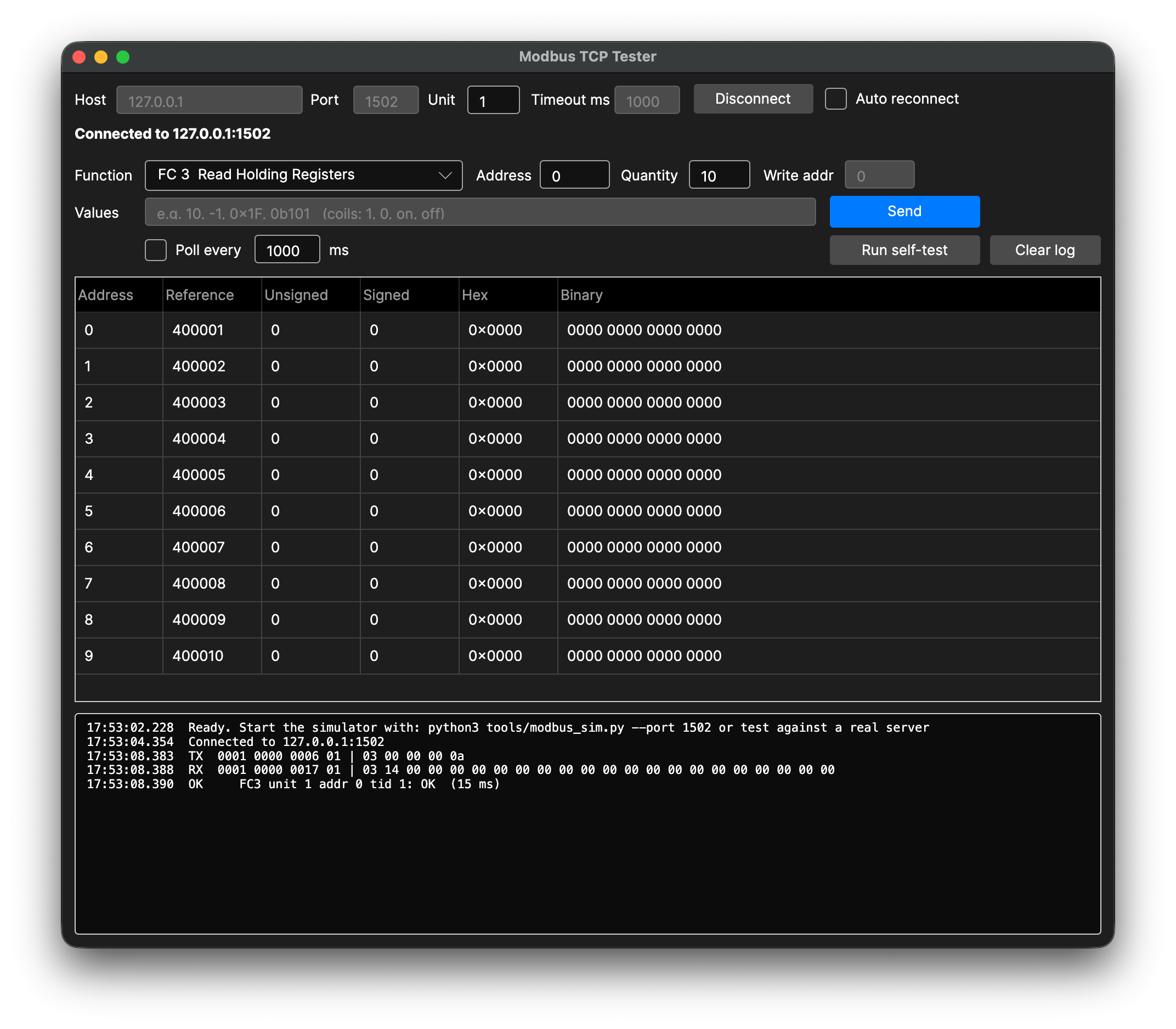
- Host, port, unit id and timeout, with optional auto reconnect.
- Function picker for all supported codes, with address, quantity, write address (FC 23) and
values. Values can be decimal, 0x… or 0b…; coils take 1/0, on/off or
true/false.
- Results table: address, Modicon reference (
400001 …), unsigned, signed, hex and binary.
- Polling of the current request.
- Log with the raw TX/RX frames, shown as
tid pid len unit | pdu.
- Run self-test runs the offline protocol checks.
The window is laid out in the window designer. Its controls are wired by name
(connectButton_Pressed, pollBox_CheckedChanged …), so if you rename a control, rename its
handler too. The rows of functionPopup must match the functionCodes list in
MainWindow.Opening.
Command line: ModbusCli
ModbusCli # offline self-test (spec examples), exit 0 = passed
ModbusCli <host> [port] [unit] # read 10 holding registers from address 0
ModbusCli --live <host> [port] [unit] # round trip of every function code
--live writes to coils 0..9 and holding registers 0..22. Use it only against the simulator or a test device.
Simulator
modbus_sim.py (Python 3, standard library only) implements FC 1, 2, 3, 4, 5, 6, 15, 16 and 23
with 10000 items per table, and returns exception codes 1, 2 and 3.
python3 modbus_sim.py --port 1502 # every unit id answered
python3 modbus_sim.py --port 1502 --fragment # responses in 3-byte pieces (tests reassembly)
python3 modbus_sim.py --port 1502 --unit 5 # answer unit 5 only (others time out)
Why a plugin?
Objo's built-in TCPClient only reads and writes Strings, and it decodes received data as
UTF-8. Every byte ≥ 0x80 is replaced.
BinaryStream works only with files. Modbus frames are binary, so the socket is a small C#
plugin that passes the bytes as MemoryBlock. A background reader also notices when the
device closes the connection while the app is idle.
Not implemented
- FC 22 (Mask Write Register), FC 24 (Read FIFO Queue) and FC 43/14 (Read Device
Identification).
- The serial-line-only diagnostics (FC 7, 8, 11, 12, 17), which don't apply to Modbus TCP.
- Modbus RTU over TCP, and server (slave) mode.
